NDISyphon is a small utility created by VIDVOX that converts NDI feeds to Syphon feeds (and vice versa). Very useful when working with both NDI and Qlab (which doesn’t inherently support NDI)
COST: Free

Playwrights' Workshop Montréal
Centre national de développement théâtral

NDISyphon is a small utility created by VIDVOX that converts NDI feeds to Syphon feeds (and vice versa). Very useful when working with both NDI and Qlab (which doesn’t inherently support NDI)
COST: Free


NDI Tools are a suite of tools made by Newtek for sharing video and audio across networks using the NDI protocol. While it is usually geared towards running on local networks as of version 5 it is possible to share video sources across the internet using NDI Bridge. NDI has direct compatibility with most modern video programs and has plugins for the Adobe Creative Cloud.
While NDI can be fairly CPU heavy to encode and decode, it can open up a whole host of possibilities for sharing video across various machines. There are apps available to share smartphone cameras and screens as NDI sources and the tools package contains the NDI webcam utility which creates a virtual webcam (for zoom, etc) using any NDI feed on the network.
The full set of tools is Windows only but the MacOS tools still offer a lot of functionality.
COST:
NDI Tools are free
Some apps are paid
Specific hardware is also available


Notion brings together document editing with project management and aims to be an all-in-one workspace for individuals and teams. Has a robust API for more advanced database configuration. In addition to being an excellent tool for organization and knowledge sharing, Notion shines as a method of rapid prototyping websites. Users with very little to no HTML knowledge can layout the flow of a site, embed various forms of media and then send a link to any testers or collaborators.
COST:
Free for individuals with up to 5 guests
$4 / month for unlimited guests
$8 / user for teams

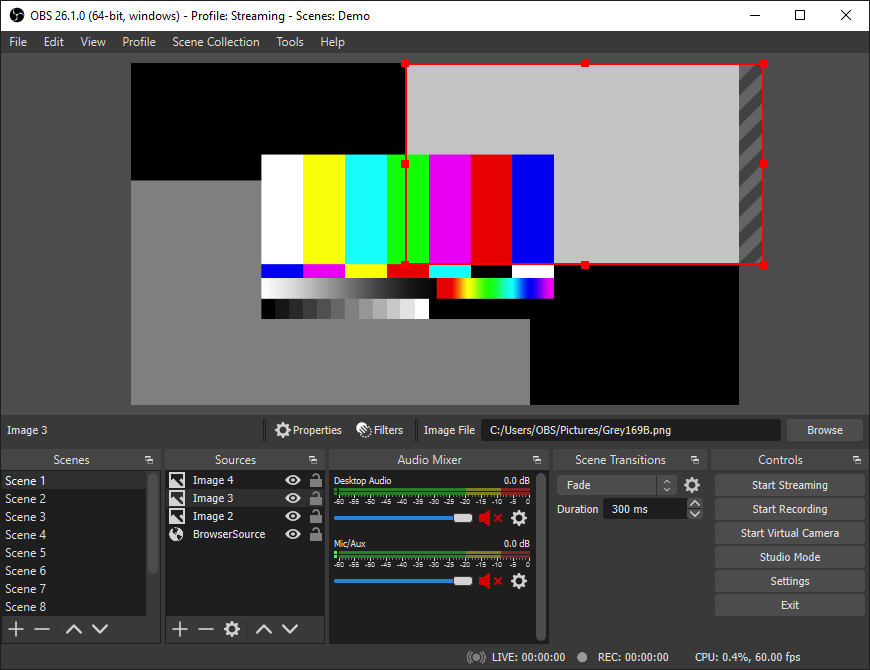
The Open Broadcast Software Project or OBS is a free and open-source software that is used for video recording and live streaming. Since it is open source, there are a lot of available plugins to extend functionality and there is a very active modding community. Originally only available via a plugin, OBS now has integrated Virtual Camera functionality. This allows you to take your OBS composition and turn it into a camera feed that can be used anywhere where a regular camera input would be taken (Zoom etc). This function opens up a wide range of streaming and remote working possibilities without requiring expensive software or hardware. OBS has a highly customizable interface but because of this can seem a little intimidating to new users.
Chroma keying can be done directly in OBS and can be pretty clean when paired with quality lighting. The combination of OBS, chroma-keying, and vdo.ninja can be quite powerful for long-distance collaboration where the desired outcome is for multiple feeds to exist in the same virtual space.
OBS has plugins that add functionality for NDI and Spout
COST: Free

Projects that used OBS:

OtterAi is an automated caption and transcription system. It has direct integration with zoom and offers user voice identification and transcript editing. Videos or audio files can be uploaded and transcribed and the transcript can be downloaded in a variety of formats including SRT’s.
COST:
Free tier with basic features
Pro at $8.33 / month
Business at $20 / month

Projects that used OtterAi:

Packet Sender is an open-source utility available on MacOS and Windows that allows for sending of TCP and UDP packets. Extremely useful when troubleshooting network commands (such as shutter commands to a projector or cues to a microprocessor.
COST: Free

Bevin Dooley (she/they) is a playwright, dramaturg, and educator based in Montréal. She is a graduate of both the University of Alberta’s Drama Department (Bachelor of Arts, 2013) and the Lir National Academy for Dramatic Art (Master of Fine Arts, 2015). Their dramaturgical practice is rooted in the empowerment of the playwright and values curiosity, clarity, self-reflection, and reciprocity in their creative collaborations. She aims to create strategies and frameworks support artists through their creative process, and is particularly interested in work that explores folklore, climate, horror, and the inner lives of youth.
As a dramaturg, Bevin has worked with playwrights through The Write Stuff with Infinithéâtre, NextFest at Theatre Network, the University of Alberta’s New Works Festival, and Alberta Musical Theatre Company. From 2017 to 2022, she was Artistic Associate at Alberta Playwrights’ Network, offering dramaturgical support to Albertan writers, as well as coordinating and overseeing training and mentorship initiatives. She has also mentored emerging artists through Imago Theatre’s ARTISTA and Nested Circles programs.
Bevin’s work as a playwright includes Nyctophobia, part of Here There Be Night (Workshop West Playwrights Theatre); IN CAMERA (CGAS Found Festival); and Slack Tide (Edmonton Fringe). Their play The Drowned was the runner up in Infinithéâtre’s 2022 Write-On-Q Competition. Their current projects include Aperture, a play with integrated film about masculinity, public image, and accountability, and Jenny Wren, a play for young audiences about a girl who enlists her local wildlife to help sabotage the construction of an AI data centre. Bevin is also part of the creative team of Climate Play, a national verbatim theatre project co-facilitated by Yvette Nolan and Joel Bernbaum.
Maureen Labonté
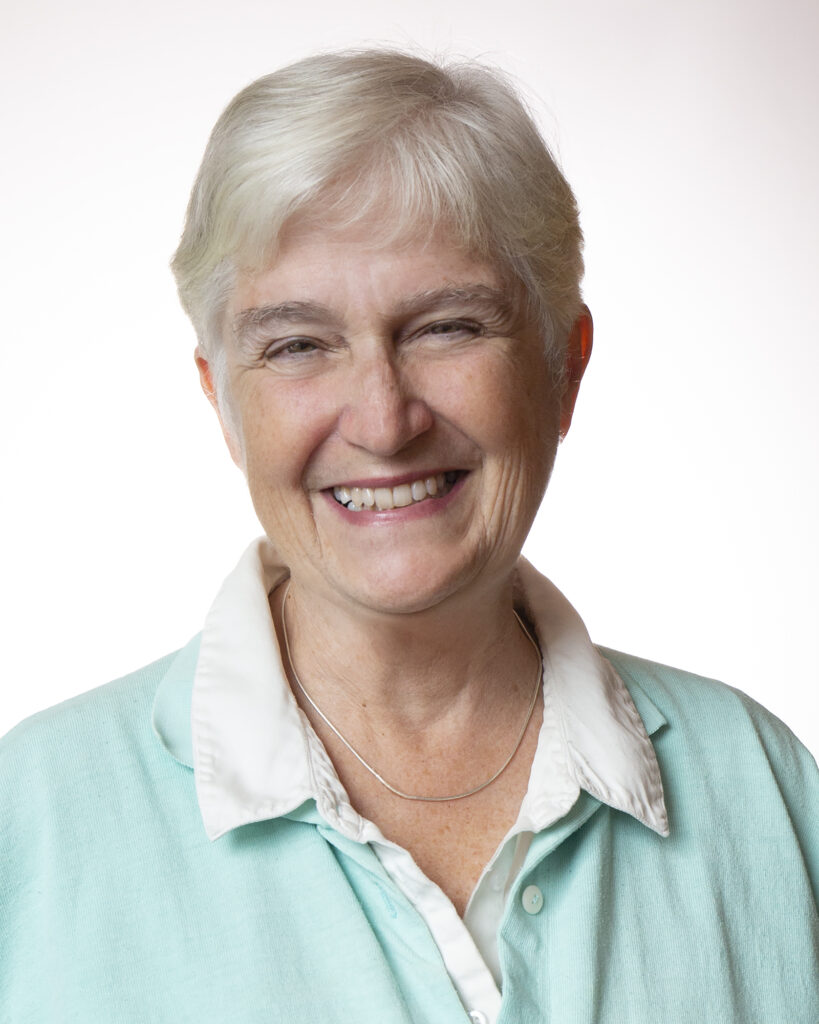
Maureen Labonte is a dramaturge, translator and teacher. She has coordinated a number
of play development programmes in theatres and play development centres across the
country including at the Banff Centre for the Arts, the Centre des auteurs dramatiques
(CEAD) in Montreal, the National Arts Centre (Ottawa) and Playwrights Workshop
Montreal. She has also worked as a dramaturge in many Franco-Canadian theatres, such
as the Théâtre du Nouvel-Ontario (Sudbury), Théâtre-Action (Ottawa), the Cercle
Molière (Winnipeg) and L’Escaouette (Moncton).
Maureen has also worked extensively as a translation dramaturge. With Emma Tibaldo,
she helped set up the Playwrights Workshop Montreal/Cole Foundation Mentorship for
Emerging Translators in 2012, and is still involved as mentor and dramaturge. This
highly successful programme is now in its eleventh cycle.
Maureen was the Jury Chair for the Siminovitch Prize in Theatre from 2009 to 2012.
From 2006 to 2011, she was Co-Director of the Banff Playwrights Colony at the Banff
Center for the Arts. Prior to that, she worked at the Colony as resident dramaturge and
then as Head of Program (2002-2005).
Maureen also worked at the National Theatre School of Canada for more than 20 years.
In the mid-90’s, she set up and ran a pilot two-year Directing Programme and then went
on to coordinate the Playwriting Programme and Playwrights’ Residency. She has taught
at NTS-ENT in the Playwriting, Directing and Mise-en-scène programmes.
She now teaches master classes in Text Analysis in both French and English across the
country.
Maureen Labonté has translated more than fifty Quebec plays into English. One of the
main focuses of her work has been in the area of Theatre for Young Audiences (TYA).
Also, And Slowly Beauty, her translation of Michel Nadeau’s Lentement la beauté was
short-listed for the 2014 Governor General’s Award in Translation.
She lives in Montreal.
Annick Lefebvre — Playwright
Annick Lefebvre est entre autres l’autrice des pièces Ce samedi il pleuvait (finaliste du prix Michel-Tremblay, 2013), La machine à révolte (finaliste du prix Louise-LaHaye, 2015), J’accuse (finaliste du prix Michel-Tremblay, du prix de la critique de l’AQCT et des Prix littéraires du Gouverneur général, 2015), Les barbelés (finaliste du prix de la critique de l’AQCT, 2019), ColoniséEs (lauréate du Prix Michel-Tremblay et finaliste des Prix littéraires du Gouverneur général, 2019), En crise (2023), Les mini manifestes (2024), La machine à cons (2025) ainsi que de très nombreux courts textes écrits pour des événements collectifs. Courts textes qui ont été rassemblés dans les recueils Périphéries (2016) et Polysémies (2022), illustrés par Vincent Partel-Valette. Elle a récrit deux fois J’accuse : pour la Belgique (2017), puis pour la France (2022). Annick plonge actuellement dans l’écriture des pièces Nos fulgurances, de Pour Jonathan et, avec l’autrice Chloé Chartrand, dans celle de Tranché.e.s. La version graphique de sa pièce En crise, illustrée par Vincent Partel-Valette, est parue aux éditions de La Bagnole en avril 2025, a été finaliste des Prix littéraires du Gouverneur général – livre illustré jeunesse, la même année et finaliste au prix Yvette-Lapointe remis par Québec BD, en 2026. Annick Lefebvre a été la protégée de l’auteur Olivier Choinière au Prix Siminovitch 2014 et finaliste de ce prix prestigieux en 2020. Annick a également été finaliste au prix Jovette-Marchessault 2025. Son théâtre est publié au Québec chez Dramaturges Éditeurs, et, en France, chez esse que.
Photo credit: Julie Artacho
Céleste Godin — Translator
Céleste Godin est un.e autrix multidisciplinaire originaire de Halifax, et habitant à Paquetville.
Depuis sa décision en 2015 de “virer artiste”, iel a écrit des chroniques, des essais, des slams et plusieurs absurdités pour le web, souvent sur sa vision plurielle de l’identité Acadienne. Iel est la papesse de Confessions Acadiennes, un projet web qui permet de révéler les vérités cachées de l’Acadie . En 2019, iel signe sa première pièce de théâtre Overlap, une lettre d’amour-haine à Moncton en simili-chiac produite par Satellite Théâtre. et publiée en 2020 chez Prise de Parole. Céleste a également écrit et joué des textes écrits sur mesure pour l’émission Tableau de Backyard, diffusée sur les ondes nationales de Radio-Canada en 2021. Sa deuxième pièce, Bouée, produite par Satellite Théâtre est produite en 2023 et publiée en 2024
À part ses projets artistiques, ces jours-ci Céleste suit ses obsessions du moment: du plastique translucide coloré, et de l’eau de pyramide.
Photo credit: Marie-Line Morneault
Sylvie Nicolas — Translator
Sylvie Nicolas is a renowned poet and literary translator who has published over thirty titles. She has been twice shortlisted for the Governor General’s Award, received the Hector-de-St-Denys-Garneau prize for her poetic sequence L’impossible visage, and was also awarded the Jean-Sébastien-Pontbriand grant for her text Dans l’enfant qui bégaie on entend Dieu parler. Her children’s book Pied-de-Puce was honoured as an Outstanding Book for Young People with Disabilities by the IBBY Documentation Centre in Norway and her book Lapin- Chagrin received nominations for the Ville de Québec/Salon international du livre de Québec Prize, the TD Canadian Children’s Book Award, and the Tamarack Award (Ontario). Among her many translations, she produced the surtitles for Margaret Atwood’s opera Pauline, presented as part of Québec en toutes lettres in 2015. She has also translated works by Alberta poet Marilyn Dumont, including A Really Good Brown Girl and The Pemmican Eaters, a collection on Gabriel Dumont, the historical figure known as Louis Riel’s right-hand man. Sylvie holds a doctorate in literature, specializing in creative writing and research. Her professional journey includes working as a theatre critic in Quebec City for Le Devoir and teaching creative writing at Université Laval for several years. For the past eight years, she has served as the literary director of Éditions Hannenorak. Nicolas believes that the novelist Jacques Poulain was right: la traduction est une histoire d’amour.
Photo credit: Sarah Élène Forcier
Sanita Fejzić — Playwright
Sanita Fejzić is a playwright whose work interrogates war, displacement, intergenerational trauma, and the imaginative possibilities of ecological and political futures. Her dramatic comedy Blissful State of Surrender premiered at the Great Canadian Theatre Company in 2022, earning five Rideau Award nominations, including a win for Best Actress. Fejzić’s theatre practice blends political urgency with intimate character work, shaped by her experience as a Bosniak refugee who fled the Siege of Sarajevo and genocide at the age of seven.
Her playwriting extends into experimental, socially engaged, and futurist forms. She produced Why Worry About Their Futures at the undercurrents festival in 2023, a triptych of ecosocial justice plays that included her tenminute piece “Expecting.” Her radio play Machines and Moss, produced by the National Arts Centre, advances the artistic movement she articulated as Peasant Futurisms, which imagines ecological, landbased futures rooted in peasant knowledge, regenerative agriculture, and anticapitalist urban design.
Fejzić is also the author of Refugee Mouth, published one month after the release of Blissful State of Surrender by Playwrights Canada Press. Her broader literary work has been recognized by the CBC Poetry and Nonfiction Prizes and appears in magazines across Canada.
A genderfluid lesbian living in Ottawa on unceded Algonquin Anishinaabeg territory, Fejzić’s writing is driven by a commitment to intersectional justice, embodied storytelling, and the creation of theatrical worlds where personal histories and political structures collide.
Photo credit: Curtis Perry
Johanna Nutter — Translator
Johanna Nutter (creaturecreature.org) developed her passion for translation through acting. One of Tiohtià:ke (Montreal)’s working bilingual artists, she’s played lead roles at both Centaur Theatre (Good People, You Will Remember Me, dir. Roy Surette) and La Licorne (Les Évènements, dir. Denis Bernard). Her creation work, notably My Pregnant Brother and its response My Playwright Sister, has toured in French and English throughout Quebec, Canada, and Europe, and was recently translated into Polish and published in the anthology Dialog. Her French self-translation, Mon frère est enceinte, was completed through PWM’s Glassco residency in Tadoussac with Linda Gaboriau. Johanna was the recipient of the Cole Foundation and PWM’s Emerging Translator Award (2016) for Florence Longpré and Nicolas Michon’s CHLORINE, which she also produced and directed for Centaur’s Brave New Looks. She received a second round of support from Cole and PWM to work with Maureen Labonté on Annick Lefebvre’s Les barbelés (NAC online), which also received a staged reading directed by Alix Dufresne. A creative co-producer for New Translation Canada, she is currently working on ColoniséEs, by Annick Lefebvre (winner of the Prix Michel Tremblay), with whom she’s also collaborating on a bilingual adaptation of Tartuffe. Other playwrights she’s translated include Guillaume Corbeil (Tu iras la chercher), Nathalie Boisvert (Facelift), Emmanuelle Jimenez (Centre d’achats), D. Kimm (Comment j’ai appris à parler aux oiseaux), and Hugo Bélanger (Alice de l’autre côté). Johanna likes to play in the spaces between established divisions.
Photo credit: Rolline Laporte
Stéphanie Labbé — Playwright
Diplômée du Conservatoire d’art dramatique de Montréal en jeu, de l’Université de Montréal en communication, de L’inis et de l’École nationale de l’humour en scénarisation, Stéphanie joue autant au théâtre, à la télévision, qu’au cinéma. Elle écrit pour le théâtre : Il faudra bien qu’un jour, présenté au Théâtre La Licorne en 2018 et en 2019 au théâtre Duceppe. Sa pièce Et puis par la fenêtre nous pourrons voir les champs se mérite une mention spéciale au prix Gratien-Gélinas (Théâtre du Bic 2023, Théâtre La Bordée 2024). En 2025, elle signe La faune locale, présentée en 5 à 7 chez Duceppe et Après t’avoir bordé tendrement, je meurs au CTD’A. En mai 2026, elle participe au Festival du Jamais lu avec son texte Papillons. En parallèle, elle collabore comme scénariste sur plusieurs projets pour la télévision, notamment Rouge forêt à Télé-Québec.
Photo credit: Fanny Migneault Lecavalier
Nick Carpenter – Workshop Facilitator
Nick’s plays, radio plays (CBC), short stories and librettos have been presented across Canada, the US, Britain and Germany. Recently a member of PWM’s Cross Cultural Adaptation Lab, he is developing a new work inspired by the Catalonian liturgical drama, El Misteri d’Elx. His play Arco took 2nd place in Infinitheatre’s 2021 Write-on-Q Competition. Nick wrote the screenplay to the film Maz (Rendez-vous Québec Cinéma, 2018). His play Stained Glass won the Canadian Peace Play Competition in 2008 and was shortlisted for the Prism International Residency Award (2003). He is an alumnus of Tapestry Opera’s Lib Lab, the Banff Playwrights Lab, Theatre Centre Residency and Writers’ Units at NAC/GCTC and Playwrights’ Workshop Montréal.
Nick teaches and coaches at the National Theatre School of Canada. As a dramaturg and mentor, he has worked with PWM (Playwrights’ Workshop Montréal), NACO (National Arts Centre Orchestra), JMC (Jeunesses Musicales Canada) and currently, with Teesri Duniya’s 2025/26 Fireworks program.
Nick has been nominated for two METAs (Montreal English Theatre Awards) for his work as a Musician and Supporting Actor.As a composer, arranger and musician for the stage, Nick has worked and collaborated with the National Arts Centre; National Theatre School of Canada; Centaur Theatre; Great Canadian Theatre Company; Lucion Media; TF1 Rock’n’Roll Circus; Repercussion Theatre; Geordie Theatre; Imago Theatre; Infinitheatre; Skeels Danse Montréal; The Theatre Centre; Hudson Village Theatre, Theatre Lac Brome; CAM en tournée; Concordia University; National Circus School; McGill and Ottawa Universities; the METAs (Montreal English Theatre Awards); Third Wall; Théâtre Urbi et Orbi (Urban Tales); Monastère Cabaret de Cirque; and on Festival productions or concerts for Magnetic North, SummerWorks, Undercurrents, WildSide, Tendance Clown (Marseille), Festival de Clowns de Montréal, Les Escales Fantastiques (Shawinigan) and Festival de cirque des Laurentides. Nick is co-founder of Summersett (summersettband.com).
Translator – Tamara Nguyễn
Tamara Nguyen est autrice et conseillère dramaturgique. En 2016, elle obtient un baccalauréat en littératures de langue française et philosophie de l’Université de Montréal et en 2019, elle termine une formation en écriture dramatique à l’École Nationale de Théâtre du Canada. Sa pièce Légendes de canapé est montée par Héloïse Desrochers en 2020 au Théâtre des Béloufilles. En 2023, la pièce Bonnes Bonnes qu’elle a co-écrite avec Sophie Gee est présentée au Théâtre Aux Écuries. La même année, sa pièce Les papillons du littoral est montée par Claudia Chan Tak au Quai 5160. Au printemps 2024, sa pièce Maelström est mise en scène par Annie Ranger au Théâtre Aux Écuries. À l’automne 2024, sa pièce La démagogie des dragons est montée par Vincent Kim au Centre du Théâtre d’Aujourd’hui. À titre de conseillère dramaturgique, Tamara a travaillé avec Claudia Chan Tak sur Au revoir zébu présenté à La Chapelle en 2022 et avec Stephie Mazunya sur la pièce S’enjailler présentée au Centre du Théâtre d’Aujourd’hui en 2024. Tamara s’intéresse à la satire politique, à la manière dont l’art peut mettre un frein au défilement de l’actualité pour permettre une réflexion de fond.
Photo credit: Maxime Côté
Alexis Diamond — Playwright
Based in Tiohtiá:ke / Mooniyang / Montreal, Alexis Diamond (she/her) is a theatre artist, opera and musical librettist, translator, dramaturg and theatre curator working in both English and French.
Since 2019, Alexis has been the English-language translation mentor for Traductions Croisées, a joint project run by Playwrights’ Workshop Montréal and the CEAD (Centre des auteurs.trices dramatiques). She was the first and only curator for English-language theatre for the francophone Festival du Jamais Lu from 2019 to 2022, facilitating translations of contemporary Canadian English-language texts into Québécois French. From 2018 to 2022, Alexis served as literary manager for a multiyear collaboration with professor Erin Hurley (McGill University) and Emma Tibaldo (then artistic director of Playwrights’ Workshop Montréal) researching the history of English-language theatre in Quebec.
Alexis has translated award-winning plays by Audrey-Anne Bouchard and Marc-André Lapointe, Pascal Brullemans, Alexia Bürger, Marie-Hélène Larose-Truchon, Érika Tremblay-Roy and Marie-Claude Verdier for companies such as Geordie Theatre, Le Petit Théâtre de Sherbrooke, DynamO Theatre, Talisman Theatre, Theatre Direct, Théâtre Incliné, Bouche Theatre Collective and Playwrights Canada Press. Alexis was a finalist for the 2020 Governor General’s Award for her translation of Pascal Brullemans’ plays for young audiences, Amaryllis and Little Witch (Playwrights Canada Press). Many of her works can be found at the Canadian Play Outlet.
Alexis has a B.A. Honours in English and Creative Writing from Concordia University and an M.A. in English Literature from the Université de Montréal. Active with various local, provincial and federal arts organizations, Alexis has also served on several theatre and playwriting juries and reading committees and mentored other artists.
Photo credit: Ron Diamond
Sami Hilvo – Translator
Sami Hilvo is a Finland-based novelist and translator who shares his life with his Polish husband, and dividing his time between his birthplace, Helsinki, and rural Kihniö in Western Finland. Other cities that have played a significant role in his life include Tokyo and Warsaw, both of which have also found their way into his writing.
Before becoming a full-time writer, Hilvo worked as a dancer, interpreter, producer, importer, and diplomat. He is also a certified translator from Japanese to Finnish. “If I didn’t write, I would probably be a hardened criminal—perhaps in prison, perhaps dead. Because I do write, I am even more hardened than a criminal, yet at least seemingly free and, without a doubt, utterly alive,” says a character in Hilvo’s debut novel. Hilvo does not entirely deny the connection between these words and himself.
His debut novel, Viinakortti, was translated into German and was also adapted into a play in Finnish. His fluency in German played a key role in the translation process, and he also worked as one of the two dramaturges in the stage adaption. The debut novel was followed by three other works, Rouva S., Pyhä peto, and Lajityypillistä käyttäytymistä, each published at intervals of a few years.
In recent years, Hilvo has expanded into essays and short stories, writing about sexual and gender minorities, as well as language, culture, and their inseparable connection. Questioning established norms and exploring new perspectives lie at the core of his literature.
Photo credit: TUUKKA ERVASTI
Leanna Brodie – Translator
Leanna Brodie is a leading translator of contemporary Québécois and Franco-Canadian playwrights. Recent premieres: Catherine Léger’s Home Deliveries (Ruby Slippers Theatre/Jericho Arts Centre, Vancouver); David Paquet’s Wildfire (Factory Theatre, Toronto); Anaïs Pellin’s Clementine (Kleine Compagnie/Carousel Theatre/PHT, Vancouver); Fanny Britt’s Benevolence (Ruby Slippers Theatre/Pacific Theatre, Vancouver); Sébastien Harrisson’s From Alaska (Belfry Theatre, Victoria); Rébecca Déraspe’s I Am William (Stratford Festival, Théâtre le Clou); David Paquet’s The Shoe (The Cherry Arts, Ithaca NY). Brodie has previously translated Christian Bégin, Louise Bombardier, Catherine Bourgeois, Hélène Ducharme, Annie Grenier, Olivier Kemeid, Gilles Poulin-Denis, Philippe Soldevila, Gabriel Sabourin, Olivier Sylvestre, and Larry Tremblay, among others. Her translations, published by Scirocco Drama and Playwrights Canada Press, have won the PGC Tom Hendry Award (David Paquet’s The Weight of Ants) and a Dora Mavor Moore Award (Wildfire) and been featured on CBC’s PlayMe podcast.
She is also an award-winning actor and writer whose original plays The Vic, For Home and Country, The Book of Esther, and Schoolhouse have been performed across Canada. Most recently, Salesman in China, written in collaboration with Jovanni Sy, premiered at the Stratford Festival and National Arts Centre to great acclaim, winning the Quebec Writer’s Federation Prize for best new play. Brodie has taught playwriting at UBC and Concordia University and translation at Playwrights Workshop Montreal, and was just commissioned for a new play by the Blyth Festival.
Photo credit: Kristine Cofsky
Alexis Diamond — Translator
Based in Tiohtiá:ke / Mooniyang / Montreal, Alexis Diamond (she/her) is a theatre artist, opera and musical librettist, translator, dramaturg and theatre curator working in both English and French.
Since 2019, Alexis has been the English-language translation mentor for Traductions Croisées, a joint project run by Playwrights’ Workshop Montréal and the CEAD (Centre des auteurs.trices dramatiques). She was the first and only curator for English-language theatre for the francophone Festival du Jamais Lu from 2019 to 2022, facilitating translations of contemporary Canadian English-language texts into Québécois French. From 2018 to 2022, Alexis served as literary manager for a multiyear collaboration with professor Erin Hurley (McGill University) and Emma Tibaldo (then artistic director of Playwrights’ Workshop Montréal) researching the history of English-language theatre in Quebec.
Alexis has translated award-winning plays by Audrey-Anne Bouchard and Marc-André Lapointe, Pascal Brullemans, Alexia Bürger, Marie-Hélène Larose-Truchon, Érika Tremblay-Roy and Marie-Claude Verdier for companies such as Geordie Theatre, Le Petit Théâtre de Sherbrooke, DynamO Theatre, Talisman Theatre, Theatre Direct, Théâtre Incliné, Bouche Theatre Collective and Playwrights Canada Press. Alexis was a finalist for the 2020 Governor General’s Award for her translation of Pascal Brullemans’ plays for young audiences, Amaryllis and Little Witch (Playwrights Canada Press). Many of her works can be found at the Canadian Play Outlet.
Alexis has a B.A. Honours in English and Creative Writing from Concordia University and an M.A. in English Literature from the Université de Montréal. Active with various local, provincial and federal arts organizations, Alexis has also served on several theatre and playwriting juries and reading committees and mentored other artists.
Photo credit: Ron Diamond
Marie-Claude Verdier – Playwright
Marie-Claude Verdier’s first play, Je n’y suis plus, was produced at the National Arts Centre’s French Theatre. In 2018, Marie-Claude became the first playwright-in-residence at the Bibliothèque et Archives nationales du Québec (BAnQ), where she worked on her play Apparitions. Her sci-fi play Seeker has won the Michel Tremblay prize from Fondation du Cead and was nominated for a Governor General Literary Award in 2022. Marie-Claude is also a dramaturg and has worked with many distinguished directors, including Marc Beaupré, Christian Lapointe, and Benoît Vermeulen. She lives in Laval.
Photo Credit: Julie Artacho
Playwright – Ho Ka Kei (Jeff Ho)
Jeff Ho is a theatre artist, originally from Hong Kong. As an actor, he has toured as Ophelia in Why Not Theatre’s Prince Hamlet across Canada and the United States over five years, and has performed coast to coast across the country.
As a playwright, his works include cockroach, Iphigenia and the Furies (On Taurian Land), Antigone: 方, and trace. His plays are published by Playwrights Canada Press.
Jeff is grateful to have been honoured with a LAMBDA Award for Best LGBTQ+ Drama, Toronto Theatre Critics Award for Best New Canadian Play (Iphigenia); finalist for the Playwright’s Guild of Canada’s Drama award (cockroach); finalist for the Governor General’s Literary Award (Iphigenia and Antigone); nominated for four Dora Awards. He is a graduate of the National Theatre School, holds an MFA from York University, and is currently the Associate Artistic Director of Tarragon Theatre.
Photo credit: Dahlia Katz
Translator & Playwright – Maryline Chery
Comédienne d’origine haïtienne, dramaturge et improvisatrice, Maryline a étudié les arts de la scène à l’université Concordia. En 2021, elle monte son premier solo «AFRODISIAQUE» présenté au Centre Segal des arts de la scène, puis au festival Zoofest (OFF Juste Pour rire) au Monument National où elle gagne le prix du spectacle de l’année (2022) et finalement dans le cadre du Conseil des arts de Montréal en tournée où elle joue le spectacle à guichet fermé (saison 2022-2023). Femme du monde, en 2018 on l’invite au 17e sommet de la francophonie à Erevan en Arménie où elle performe et donne des ateliers en écriture et interprétation. Chery a aussi fait partie de la cohorte de mentorat artistique du Black Theatre Workshop 2018-2019. Chery touche également à la mise en scène en co-dirigeant la deuxième édition du « Projet Racines » au Théâtre Espace Libre (2021). On a pu la voir dans des séries notables telles Doute Raisonnable (2023) et District 31 (2020). En 2022 elle est l’heureuse récipiendaire du prix Gloria Mitchell Aleong décerné par le théâtre Black Theatre Workshop pour son excellence artistique, son esprit communautaire et ses initiatives dans le domaine des arts. En 2024, Chery se voit décerner le prix de comédienne de l’année volet théâtre au Gala Dynastie. La même année elle publie également sa première pièce AFRODISIAQUE chez ‘Hurlantes Éditrices’.
Maryline prend sur elle la responsabilité de représenter les richesses de la culture créole dans son art en tant qu’écrivaine et comédienne. Sa mission : créer des pièces vibrantes, diverses, engagées et colorées à son image.
Photo Credit: Annie Diotte
Playwright – Rébecca Déraspe
Rébecca Déraspe est autrice de plusieurs oeuvres jouées, publiées et traduites à travers le monde dont Janette, Les Glaces, Fanny, Faire crier les murs, Les filles du St -Laurent , Ceux qui se sont évaporés, Combattre le why why, Fuir le fléau , Le merveilleux voyage d’Ines de l’Ouest, Deux ans de votre vie , Plus que toi , Peau d’ours , Gamètes , Nino, Je suis William , Le merveilleux voyage de Réal de Montréal , Partout ailleurs et Nos petits doigts.
Elle signe aussi les adaptations de Membrane, Féministe pour Homme, La nuit des rois, Maison de poupées, Roméo & Juliette et Orgueil & préjugés.
Diplômée en 2010 du programme d’écriture dramatique de l’École nationale de théâtre du Canada, Rébecca reçoit le Prix BMO auteur dramatique 2012 pour son tout premier texte, Deux ans de votre vie . Ses œuvres subséquentes seront honorées à de multiples reprises dont Gamètes en 2017 (Prix du Meilleur texte original – AQCT), Je suis William en 2018 (Prix du Meilleur spectacle jeune public – AQCT), Ceux qui se sont évaporés en 2020 (Prix Michel -Tremblay pour le Meilleur texte porté à la scène – CEAD et Prix du Meilleur texte original – AQCT ), Combattre le why why, en lice pour les Prix littéraires du Gouverneur-général en 2021 et Les Glaces, nommé aux Prix littéraires du Gouverneur-Général en 2023 et récipiendaire du Prix Michel Tremblay (2023) la même année.
Les œuvres de Rébecca jouissent d’une reconnaissance qui déborde des frontières du Québec. En 2016, Nino voit le jour à Genève. Sa pièce chorale Les filles du St -Laurent (écrite en collaboration avec Annick Lefebvre) est créée à Paris en novembre 2021 au Théâtre de la Colline. À la même période, la toute première représentation de Fanny est présentée à la Comédie de Reims, avant d’être jouée à Paris au Théâtre Ouvert . Depuis 2020 , ses pièces Gamètes (Keimzellen ) et Peau d’ours (Bärenfalle ) prennent l’affiche de différents théâtres à Berlin et ailleurs en Allemagne.
Photo Credit: Marc-Étienne Mongrain
Bobby Theodore — Translator
Bobby Theodore is a scriptwriter, dramaturg, and translator. After graduating from the National Theatre School of Canada’s playwriting section in 1998, he was a Governor General Award finalist in 2000 for his translation of 15 Seconds by François Archambault. Since then, Bobby has gone on to translate over 35 plays from French to English and has received 2 Betty Mitchell Awards (with François Archambault) for Outstanding New Play. For the stage, he co-created 300 Tapes (with Ame Henderson), which premiered at the Theatre Centre in Toronto and at Alberta Theatre Projects in Calgary. His most recent projects include a translation of Paradise in Flames by François Archambault, a transadaptation of Public Enemy by Olivier Choinière (Published by Playwrights Canada Press, Produced by Canadian Stage), and working as content developer and scriptwriter on the new visitor experience for Province House in PEI. Currently, Bobby is co-writing (with JC Niala) The Importance of Being Oscar Wilde’s Valet, a counterfactual exploration of Wilde’s relationship with Stephen Stephens, a Black minstrel performer he hired as his valet while touring the US.
Photo Credit: Keith Barker
Danielle Le-Saux Farmer — Translator
Comédienne, metteure en scène, autrice et traductrice, Danielle Le Saux-Farmer est diplômée de l’Université d’Ottawa en théâtre, et du Conservatoire d’art dramatique de Québec en interprétation. Elle a assuré la direction artistique et générale du Théâtre Catapulte de 2017 à 2023. Depuis sa sortie de l’école en 2011, elle a joué au Théâtre du Trident, à la Bordée, à Premier Acte, au Périscope, au Théâtre la Licorne, au Théâtre Denise-Pelletier, ainsi qu’en tournée à travers le Canada. On a pu la voir, entre autres, dans Le Projet Laramie au Théâtre du Trident, dans l’adaptation théâtrale de La Guerre des Tuques de Fabien Cloutier et dans L’art de la chute, projet qui la compte comme coautrice et pour lequel elle reçoit une nomination pour un prix d’interprétation. Elle a signé trois traductions pour le théâtre : Avant l’archipel d’Emily Pearlman, création dans laquelle elle joue et qui a connu plus de cent représentations, Beyond the Night Sky, une création des Nuages en pantalon et The Art of the Fall, traduction publiée de L’art de la chute aux éditions QC Fiction. Elle a également assuré la mise en scène d’une adaptation de Dans le bois de David Mamet en 2013, d’une création du Collectif du Vestiaire, Le Jeu, texte de Pascale Renaud-Hébert, en 2017, ainsi que Princesse de personne de Pascale Renaud-Hébert. Plus récemment, on a pu la voir dans la tournée pancanadienne de Un.Deux.Trois. de Mani Soleymanlou. Danielle était de la distribution de Durant des années de Louis-Philippe Roy à l’automne 2023 et a créé, à l’écriture, mise en scène et interprétation, le premier chapitre de son projet de théâtre documentaire sur la langue française, Oh! Canada.
Photo Credit: Stéphane Bourgeois
Sophie Gee — Translator
Sophie is a director and creator of multidisciplinary work. Through her company Nervous Hunter, her works include Bonnes Bonnes (Théâtre Aux Écuries), Lévriers (MAI (montréal, arts interculturels), National Arts Centre, CAM en tournée), and The Phaedra Project (No! I! Don’t! Want! To! Fall! In! Love! With! You!) (MAI (montréal, arts interculturels)). Her directing work for other companies include Habibi’s Angels: Commission Impossible by Hoda Adra and Kalale Dalton-Lutale (Talisman Theatre), The Tropic of X by Caridad Svich (Imago Theatre), and Duos en morceaux for Théâtre INK. In January 2024, she was a directing consultant on Chimerica at Théâtre Duceppe where she directed the scenes in Mandarin. Alongside set and costume designer Eo Sharp, she recently completed Un an en défilés, a monthly series of participatory parades in Verdun to explore the act of walking together as a community over a year. Sophie is a graduate of the directing programme at the National Theatre School.
Photo Credit: Jeremy Cabrera
Evelyne de la Chenelière — Playwright
Écrivaine et comédienne, Evelyne de la Chenelière est une figure incontournable de la scène québécoise et de la dramaturgie contemporaine.
Ses pièces de théâtre, traduites et montées au Québec et au Canada comme ailleurs dans le monde, interrogent les limites du langage et l’expérience de l’écriture. En 2017, elle est finaliste pour le Prix Siminovich à l’excellence et à l’innovation en théâtre canadien, et reçoit en 2018 la distinction de Chevalier des Arts et des Lettres de la République française.
Parmi ses pièces, La vie utile, créée à Espace Go et présentée au Festival TransAmériques dans une mise en scène de Marie Brassard, a reçu le prix Marcel Dubé de l’Académie des lettres du Québec. Bashir Lazhar a fait l’objet d’une adaptation au cinéma par le cinéaste Philippe Falardeau, sous le titre de Monsieur Lazhar. Le film a été mis en nomination pour l’Oscar du meilleur film en langue étrangère. Son plus récent texte, Le traitement de la nuit, a été créé par Denis Marleau à Montréal et par Kornelius Eich à Francfort dans sa traduction allemande.
Régulièrement invitée à aborder sa pratique et les thèmes parcourant son œuvre, elle a participé comme conférencière à différents festivals de littérature et de théâtre à Mexico, Barcelone, Limoges, Toulouse, Paris, Édimbourg, Londres, Sarrebruck, ainsi qu’au Caire.
Elle a également donné des classes de maître et participé à des colloques (Conservatoire d’art dramatique de Montréal, Université de Munich, Conservatoire de Tours, Université de Valencia, Université de Madrid, École Normale Supérieure de Paris).
Comme comédienne, on a pu la voir s’illustrer, entre autres, sous la direction de Marie Brassard, Daniel Brière, Jérémie Niel, Brigitte Haentjens, Florent Siaud, Cédric Delorme-Bouchard, et plus récemment le cinéaste Denis Côté.
Le parcours d’Evelyne de la Chenelière est marqué par une exploration formelle et un désir de questionner l’art vivant, tant par l’écriture que par le jeu. Sa singularité fait d’elle une artiste qui déjoue les attentes. Elle est présente dans les grandes institutions au Québec et à l’étranger, mais aussi dans le secret de leurs marges.
Photo Credit: Charlotte de la Chenelière
Maud de Palma-Duquet — Playwright
Maud de Palma-Duquet obtient son diplôme du Conservatoire d’art dramatique de Québec en 2012. La même année, elle participe aux Chantiers du Carrefour International de théâtre de Québec. Elle bénéficie également d’un mentorat d’écriture avec l’auteur Fabien Cloutier grâce à la mesure Première Ovation. La pièce qui en résulte, Enfant unique, est mise en lecture au théâtre Premier Acte. En 2013, elle participe à la soirée de clôture du Festival du Jamais Lu Québec en tant qu’autrice et comédienne. C’est dans le cadre de ce même festival, lors de l’édition montréalaise du printemps 2022, que son texte Bénévolat est mis en lecture pour la première fois. Cette pièce lui mérite le prix Gratien Gélinas et est présentée au Théâtre La Licorne en janvier et février 2024 avant d’être reprise en décembre. Comme interprète, on a pu la voir notamment dans Act of god, une production du Théâtre Niveau Parking, ainsi que dans Chante avec moi d’Olivier Choinière. Éternelle curieuse, elle a aussi étudié en droit et en journalisme à l’Université de Montréal.
Photo Credit: Paule Beaudoin
Tamara Nguyen — Playwright
Tamara Nguyen est autrice et conseillère dramaturgique. En 2016, elle obtient un baccalauréat en littératures de langue française et philosophie de l’Université de Montréal et en 2019, elle complète une formation en écriture dramatique à l’École Nationale de Théâtre du Canada. Sa pièce Légendes de canapé est montée par Héloïse Desrochers en 2020 au Théâtre des Béloufilles. En 2023, la pièce Bonnes Bonnes qu’elle a co-écrite avec Sophie Gee est présentée au Théâtre Aux Écuries. La même année, sa pièce Les papillons du littoral est montée par Claudia Chan Tak au Quai 5160. En 2024, sa pièce Maelström est mise en scène par Annie Ranger au Théâtre Aux Écuries. À titre de conseillère dramaturgique, Tamara a travaillé avec Claudia Chan Tak sur Au revoir zébu présenté à La Chapelle en 2022 et avec Stephie Mazunya sur la pièce S’enjailler qui est présentée au Centre du Théâtre d’Aujourd’hui en 2024. Tamara s’intéresse à la satire politique, à la manière dont l’art peut mettre un frein au défilement de l’actualité pour permettre une réflexion de fond.
Photo Credit: Maxime Côté
Linda Gaboriau — Translator
Translator and dramaturg, Linda Gaboriau has translated over 125 plays and novels from the French, including the works of Québec’s most prominent playwrights. Her translations of plays by Michel Marc Bouchard, Normand Chaurette, Daniel Danis, Wajdi Mouawad and Michel Tremblay have been published and widely produced across Canada and abroad. Her long collaboration with Michel Marc Bouchard has included the film adaptations of Lilies (1996 Genie Award, Best Motion Picture), The Tale of Teeka et The Girl King, directed by Mika Kaurismaki. Her theatre translations have garnered many awards across Canada. She has been a finalist for the Governor General’s Award for Translation six times and she won this award in 1996 for Stone and Ashes (Daniel Danis), in 2010 for Forests (Wajdi Mouawad) and in 2019 Birds of a Kind (Wajdi Mouawad). Her most recent publication is with Talon: TWISTS OF FATE which includes the translation of two Michel Tremblay novels: AU HASARD LA CHANCE/IF BY CHANCE et LES CLEFS DU PARADISE/DESTINATION PARADISE. And soon to be published and premiered at Centaur Theatre: EMBRASSE/KISSES DEEP by Michel Marc Bouchard. For several years she was in charge of the dramaturgical workshops at Montreal’s Centre des auteurs dramatiques (CeAD) where she subsequently coordinated translation and exchange projects with English and Spanish-speaking countries. At the Banff Playwrights Colony she was an associate director, in charge of translation projects. From 2002-2007, she was the founding director of the Banff International Literary Translation Centre. Linda Gaboriau was named a Member of the Order of Canada in 2015 and an Officer of Ordre national du Québec in 2023.
Photo Credit: Josée Lambert
Olivier Choinière — Playwright
Depuis plus de vingt ans, Olivier Choinière œuvre comme auteur, metteur en scène et traducteur pour le théâtre. Il est co-directeur général et artistique de L’ACTIVITÉ, compagnie de création basée à Montréal. Diplômé en écriture de l’École nationale de théâtre en 1996, Olivier Choinière est lauréat du Prix Gascon-Thomas 2015 et du Prix Siminovitch 2014, remis à un auteur dramatique canadien.
Il se fait connaître avec Le bain des raines (1998), puis par Autodafé (1999), mis en scène par André Brassard. Ses pièces Venise-en-Québec (2006) et Nom de domaine (2013) ont été finalistes des Prix du Gouverneur Général du Canada. Félicité (2007) a été présenté au Royal Court Theatre de Londres. Plusieurs de ses pièces ont été traduites et ont été jouées au Canada, en Europe et en Asie.
En 2000, il fonde L’ACTIVITÉ, compagnie de création basée à Montréal, avec laquelle il met en scène près de 20 spectacles, dont Chante avec moi (2010), Mommy (2013), Ennemi public (2015), qui s’est valu le Prix Michel-Tremblay, Manifeste de la Jeune-Fille (2017), qui s’est vu récompensé par le Festival Primeurs ainsi que Zoé (2020), Prix Marcel-Dubé. 8 de ces spectacles prenaient la forme de déambulations sonores à travers la ville.
Olivier Choinière enseigne à l’École nationale de théâtre du Canada et donne fréquemment des conférences et des ateliers. Ses textes sont publiés chez Atelier 10, Leméac et Dramaturges éditeurs.
À travers ses œuvres, il explore différentes formes de représentations et cherche à donner un rôle actif aux spectateurs.
Photo Credit: Charles Lafrance
“Playwrights’ Workshop Montréal has completely transformed my experience of being an artist. Fatma Sarah Elkashef and I had our first dramaturgical conversation in 2018, and in a way, it hasn’t stopped. For the past five years, we have collaborated on two very different projects: a five character play with music about a rockstar family and the complicated legacy of our cultural icons, and a digital-hybrid solo show about power, coercion, and escaping a cult. We share a belief that how we make work is as important as the work itself. From ongoing dramaturgical conversations, to dramaturgical residencies (2022, 2023), to full-cast workshops (2020, 2021, 2023), to the Gros Morne Residency in Newfoundland (2022), Playwrights’ Workshop Montréal has provided me with unparalleled and essential support. I wouldn’t be the playwright I am today without this organization.”
– Scout Rexe
“Ever since my graduation from theatre school in 2015, Playwrights’ Workshop Montréal has been an invaluable support, both institutionally and personally. They supported further development of my solo show Miss Katelyn’s Grade Threes Prepare for the Inevitable, which went on to have over 75 performances in English and French, as well as my site-specific Everyone We Know Will Be There, which ran in residential houses in Edmonton in Calgary back in 2016. They’ve offered me ongoing access to an environment where I’m able to witness new play development in action. As a playwright, it can be rare to receive support that has no agenda, where your supporters’ only objective is to help you germinate a story that you yourself are happy with before anyone else. This has always been my experience with PWM, making it one of my favourite theatre institutions in Canada, and a place that I recommend to other playwrights enthusiastically and often.”
– Elena Belyea
“I really got involved in activities during the pandemic, searching for ways to stay creative and stay sane; I came across PWM’s call for submissions – online opportunities. PWM’s Digital Dramaturgy Initiative – Montreal residency in 2021 was my first experience and I had a wonderful and enlightening experience learning and deepening my understanding of theatre and the art of thinking and writing for theatre. I went on to also participate in:
I enjoy the fact that they always have interesting offerings for development and mentorship. I love the staff, as well as the individuals they bring in to facilitate workshops. They have all been down to earth, open, knowledgeable, and just fun to be around and speak to on a human level.
Having the opportunity to incorporate theatre and writing into my dance practice has been a very rewarding journey. I am grateful for the time I’ve been able to spend with both Sarah and Aki in conversation and for the relationships fostered. The individuals who make up an organization are important and PWM has wonderful individuals all throughout.
As I’ve been working on my first play, ‘Wild Roots’, PWM has been gently riding the wave, supporting my explorations and development in playwriting. I never feel pressured to present as anything or one other than me, allowing myself to feel the freedom to really find my own voice and solidify my own footing. That is huge for me.
In the end, what I can say is PWM, ‘Thank you for being a friend!’”
– Jamila Joseph
“For as long as I can remember, PWM has been an artistic and social hub of the community. One can always depend on great conversation and artistic exchange when you spend time there. As a young actor it was always a point of pride to be hired to read a new script in workshop: it was a wonderful job no matter how quickly you passed through their doors or how long you stayed; it has been some of the best training I have ever received as an actor. It taught me how to be clear and rigorous and respectful. As a playwright, I have received an incredible amount of support from the folks at PWM and would have never completed my last play without their belief in me. The relationship I have with PWM is a rare one. I have taken that and used it to build the artist I have always wanted to become. Dramaturgy received through PWM: The Tashme Project: The Living Archives and Mizushōbai- The Water Trade. Residencies through PWM: Gros Morne, ÉsterELLE- 2019. I have participated in endless workshops and a multitude of invaluable Master Classes, like playwriting with Daniel MacIvor, Carole Fréchette and Robert Chafe.”
-Julie Tamiko Manning
Actor, theatre creator, playwright, mentor, independent producer
Montreal/ Tiohtià:ke/ Mooniyang
“Without Playwrights’ Workshop Montréal, I would not have the career in theatre translation that I have. Nor would I have been able to sustain a career in Montreal as a playwright working in both English and French. PWM introduced me to the Francophone-theatre milieu as a potential translator in the 2010s. From there grew my familiarity with the agents and stakeholders of the milieu, which led to me serving as a kind of bridge between Anglophone and Francophone theatre in Montreal, a role I happily play today, along with a growing number of bilingual and multilingual artists who make their livelihoods in both English and French in this city.
I had my first experience with theatre translation in the PWM Translation Unit with Maureen Labonté in 2010-2011. That was when I initially started work on the translation of Amaryllis [Vipérine] by Pascal Brullemans. In 2016, I participated in PWM’s Glassco Translation Residency in Tadoussac for Amaryllis [Vipérine], this time with the guidance of Bobby Theodore. The book Amaryllis and Little Witch (Playwrights Canada Press) would later go on to be nominated for the Governor General’s Award for translation in 2021.
In 2013, I was the first ever recipient of PWM’s Cole Foundation Mentorship for Emerging Translators to translate Je n’y suis plus (Marie-Claude Verdier), which was workshopped and received a public reading at PWM. I would go on to mount a production, directed by Jen Quinn, at Toronto’s SummerWorks Festival in 2016, to great acclaim.
In 2018, Talisman Theatre commissioned the translation of Minuit by Marie-Hélène Larose-Truchon. Workshopped through PWM, it gave me the opportunity to benefit from the tutelage of the Grande Dame of Québécois-theatre translation, Linda Gaboriau, and also to journey to New Orleans, where we had a workshop with local actors and a public reading at the Southern Repertory Theatre.
In 2019, I participated in “Theatre Translation Workshop with Frank Heibert”, offered through PWM’s Exploring Practice program, to work on Marie-Claude Verdier’s touring play, Andy’s Gone (Playwrights Canada Press). The book was one of five selected in 2022 for Top Grade: CanLit for the Classroom, a program run by the Association of Canadian Publishers’ Children’s Committee.
In 2020, I was commissioned by PWM to translate Camille : le récit by Audrey-Anne Bouchard and Marc-André Lapointe and in 2022, Camille: The Story was produced at the Segal Centre, where it won a META Award for best production.
Having benefited from the tutelage and mentoring of the giants of Québécois theatre translation – Maureen Labonté, Linda Gaboriau and Bobby Theodore – PWM then deemed me ready to serve as a mentor to emerging translators. Since 2019, I have had the honour of being the translation mentor for Traductions Croisées, the program jointly organized by Playwrights’ Workshop Montréal and Centre des auteurs.trices dramatiques (CEAD) to encourage the emergence of new translators for Québécois plays.
As part of the Traduction Croisées mentorship program (Introduction to Theatre Translation), I mentored Katherine Turnbull for her translation of La nuit du 4 au 5 by Rachel Graton, which was produced by Talisman Theatre in 2022. Katherine Turnbull was just selected as the 10th mentee for the Cole Foundation Mentorship for Emerging Translators.”
-Alexis Diamond
Other Worlds will be presented with as a Geordie Theatre mainstage production from September 29 – October 7, 2023.
Alexis Diamond — Translator
A proud Montrealer, Alexis Diamond (she/her) is an anglophone theatre artist, opera and musical librettist, translator, dramaturg and theatre curator working on both sides of Montréal’s linguistic divide. She creates works for a wide range of audiences, from toddlers, to school-aged children, to all ages, to adults only, which have garnered awards, residencies, and attention at home and abroad. Alternately playful, poetic and profound, her texts and performances break open the stories we inherit and the myths we perpetuate, often to our detriment. She was a finalist for the 2020 Governor General’s Award for her translation of Pascal Brullemans’ plays for young audiences, Amaryllis and Little Witch (Playwrights Canada Press). Alexis is a member of the Board of the Conseil québecois de théâtre. She has a B.A. Honours in English and Creative Writing from Concordia University and an M.A. in English Literature from the Université de Montréal.
Headshot by Ron Diamond.
Even Gilchrist — Playwright
Even Gilchrist (he/him) is a theatre designer and creator based on Treaty 6 territory, located in amiskwaciy (or Edmonton, AB). He is a recent MFA Theatre Design graduate of the University of Alberta, and received his undergraduate degree in theatre from the University of Ottawa.
As a scenographer, his desire for creative processes lives in finding ways in which design is the catalyst of storytelling, rather than reactionary to the script, and was very much so the case in the creation of Re:Construct.
Recent design credits include: Boy Trouble (Production Design – Amoris Projects) and 10 Funerals (Set and Lighting Design – Shadow Theatre). Check out evengilchrist.com for more info on new projects!
Headshot by BB Collective.
Jasmine Dubé — Auteure dramatique
Cofondatrice et directrice artistique du Théâtre Bouches Décousues (TBD), Jasmine Dubé est comédienne, au- teure et metteure en scène.
Sa première pièce, Bouches décousues, a été jouée plus de 350 fois au Québec et en Europe. Petit monstre s’est méritée le prix de la meilleure production « jeunes publics » de l’Association québécoise des critiques de théâtre en 1992. La bonne femme a remporté trois Masques décernés par l’Académie québécoise du théâtre en 1996 : Production « jeunes publics », Texte et Mise en scène. Ma petite boule d’amour (2018), Le pingouin (2002), La mère merle (2000) et Le bain (1998) ont reçu le prix du public à Beloeil. La série Nazaire s’est retrouvée finaliste des prix Chronos 1997, en France et en Suisse. En 1998, l’album L’ourson qui voulait une Juliette a reçu le prix Alvine-Belisle, choix des bibliothécaires pour le meilleur livre jeunesse. Certains de ses textes sont traduits en anglais, portugais, espagnol, grec, innu-aimun et en italien.
En 1996, Jasmine Dubé a reçu le prix Arthur-Buies pour l’ensemble de son œuvre. En 1998, Artquimédia lui décernait l’Agathe de distinction pour son rayonnement artistique à l’échelle nationale et internationale et elle recevait de la Renaissance française, la médaille du Rayonne- ment Culturel. En 2006, TBD était le lauréat du Grand prix du Conseil des arts de Montréal pour « son apport immense à la vit alité et au déve- loppement du théâtre d’ici ». En juin 2010, on inaugurait la bibliothèque Jasmine-Dubé à Amqui. En 2013 elle recevait le Prix Raymond-Plante pour son travail exceptionnel en littérature jeunesse.
Headshot par Angelo Barsetti.
Émanuel Dubbeldam — Translator
Émanuel Dubbeldam is a queer and transgender franco-albertan artist based in Edmonton. He has been acting onstage and onscreen since his childhood and began working in the industry as a professional in 2010. With many years of acting, hosting, and emceeing under his belt, Émanuel also writes sketches, screenplays and stage plays in his two first languages.
Headshot by Liam Mackenzie.
François Grisé — Auteur dramatique
François Grisé est comédien et artiste multidisciplinaire. Sa pratique englobe les codes du théâtre, mais aussi de la performance, de l’installation et des arts visuels. En 2012, il fonde Un et un font mille pour accueillir ses créations hybrides: œuvres multidisciplinaire, événements, tableaux vivants et activités d’innovation sociale.
En 2017, il écrit Tout inclus, une pièce de théâtre-documentaire. Elle a enclenché un grand cycle de création et d’action face aux réalités du vieillissement. Dans son prolongement, il a créé le mouvement HABITATS, un espace d’innovation sociale et d’action citoyenne où l’on se pose activement la question : Comment voulons-nous habiter notre vieillesse?
Violeta Sarmiento Marabotto — Traductrice
Née à Mexico, Violeta Sarmiento est comédienne, diplômée du Centro Universitario de Teatro (CUT) de l’Université Nationale Autonome du Mexique (UNAM). Elle a aussi un diplôme en psychologie avec mention honorifique (UNAM).
De 2012 à 2014, elle suit le programme de maîtrise sur les méthodes de formation théâtrale pour les pratiques pédagogiques innovantes intitulé The New Face of Acting Teachers, sous la direction de Jurij Alschitz (UNAM). Elle a également une maîtrise en psychothérapie intégrale à l’Instituto de Psicoterapia Integral y Ciencias de la Salud en 2021.
En 2011, elle participe au séminaire sur la traduction de littérature dramatique francophone organisé par Boris Schoemann et Humberto Pérez Mortera.
En 2012, elle fonde l’Instituto Magia Producciones, où elle est traductrice, productrice, metteuse en scène et comédienne. Elle se spécialise dans la traduction en espagnol de la dramaturgie en langue française.
En 2018, elle est invitée à la rencontre internationale Dramaturgies en Dialogue, organisée par le Centre des auteurs dramatiques (CEAD) à Montréal, en tant que productrice, traductrice et metteuse en scène.
Parmi les œuvres qu!elle a traduites, produites et jouées, on peut citer Portrait Chinois d’une imposteure de Dominick Parenteau-Lebeuf, Petite Sorcière de Pascal Brullemans, Huis clos de Jean Paul Sartre, qui a remporté le prix de la meilleure production au XIVe Festival National de Théâtre au Mexique en 2006. Iris tient salon de Dominick Parenteau-Lebeuf a été présentée de 2015 à 2020, y compris dans des festivals au Mexique et au festival Les Coups de Théâtre en 2018.
En 2022, Petite Sorcière a été en nomination par l’ACPT (Agrupación de Críticos y Periodistas de Teatro) dans deux catégories : meilleure pièce pour le jeune public et meilleure conception de mouvement. En 2016, Iris tient salon a été nominée par l!ACPT dans la catégorie : meilleure actrice révélation.
Entre 2014 et 2018 elle est membre de la troupe permanente de la Compañía Nacional de Teatro (CNT). À deux reprises, (2011-2012) et (2019-2020), elle reçoit la subvention gouvernementale du FONCA (Fonds national pour la culture et les arts) dans le programme Créateurs de scène.
Entre 2011 et 2013, elle a joué en espagnol les œuvres d’origine québécoise Forêts et Ciels de Wajdi Mouawad, sous la direction de Hugo Arrevillaga.
Sa formation multidisciplinaire comprend la musique, le chant, la danse et le théâtre. Dans le domaine vocal, elle a étudié les techniques de Bel Canto, Roy Hart et Linklater. Elle possède aussi une formation en danse classique et fait de fréquentes mises à jour des techniques contemporaines. Elle a fondé le groupe musical Expresso doble. Pendant cinq ans, elle a produit des spectacles et enregistré des chansons en studio.
Elle enseigne Jeu réaliste à Casazul (École des arts du spectacle), de même que Voix et parole à la Casa del Teatro. De 2008 à 2016, elle a enseigné Expression du vers du Siècle d’Or espagnol au CUT-UNAM, et, en 2012, à CEUVOZ. Elle exerce également sa pratique comme psychothérapeute intégrale.
Charles Bender — Translator
Charles has been a regular presence at the helm of the Indigenous Day Live event and is the host of Sans reserve on APTN. We recently saw him as host of the National Truth and Reconciliation live event broadcast on CBC and APTN. He has also worked as host/facilitator for many aboriginal organisations or events across Canada.
As an actor, you might have caught him in Sioui-Bacon, Mohawk Girls or, more recently, as Joe Naveau in Eaux Turbulentes or Frère Brière in Pour toi Flora. On stage, he has worked with many companies with social justice as part of their mandate such as Teesri Duniya, Ondinnok and Tableau d’Hôte.
In 2015, Charles co-founded productions Menuentakuan, an indigenous theatre company invested in creating new paths of dialogue amongst indigenous and non-indigenous people in Canada. He has translated various plays by indigenous authors such as Where The Blood Mixes by Kevin Loring, Thuderstick by Kenneth T. Williams, Free as Injuns by Tara Beagan and alterNatives by Drew Hayden Taylor. He has just finished translating Maria Campbell’s Halfbreed and is currently working on translating Tomson Highway’s Permanent Astonishment. As part of his community involvement, he sits on a variety of boards and comities to make sure indigenous voices are represented and heard.
Developed plays include Governor General Award nominated works by Sean Dixon, Brendan Gall, Jonathan Garfinkel, Michael Healey, Joan MacLeod, and Hannah Moscovitch, and Governor General Award-winners Erin Shields and David Yee; eleven Dora Award Outstanding New Play nominees and three winners; and a Trillium Book Award winner. Throughout her career, Andrea has been a regular panellist for the Directors Lab North, and contributed a chapter entitled “Master Class: Dramaturgy and New Play Development” to the book The Directors Lab edited by Evan Tsitsias (Playwrights Canada Press 2019). She has mentored both graduate students and professional theatre makers through university training programs, internships, and play development programs at a variety of theatres. Previously, she has worked with Brian Quirt at Nightswimming and with Maureen Labonté and Neil Munro at the Shaw Festival, and contributed to Canadian Stage’s inaugural Festival of Ideas and Creation. Andrea also participated in workshops at the National Theatre Society (Dublin) while she pursued her MPhil in film and theatre at Trinity College, Dublin.


PWM est situé en territoire autochtone, lequel n’a jamais été cédé. Nous reconnaissons la nation Kanien'kehá: ka comme gardienne des terres et des eaux sur lesquelles nous exerçons. Tiohtiá:ke / Montréal est historiquement reconnu comme un lieu de rassemblement pour de nombreuses Premières Nations. Aujourd'hui, une population autochtone diversifiée, ainsi que d'autres peuples, y résident. C’est dans le respect des liens passés, présents et futurs que nous reconnaissons les relations continues entre les Peuples Autochtones et autres personnes de la communauté montréalaise.
